Suitchi
DIY Smart Switch with HomeKit and Home Assistant support, built on the ESP8266.
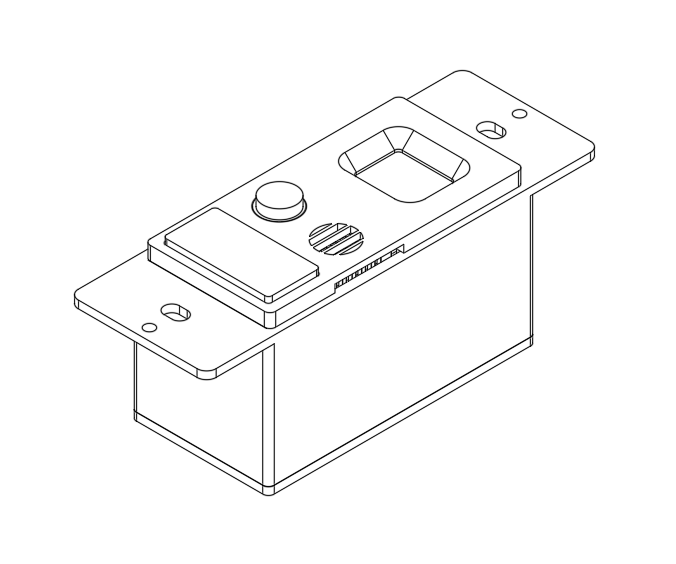
Features
- Apple HomeKit — native HomeKit bridge, no hub required. Exposes switch, temperature, humidity, motion, and occupancy as separate accessories
- Home Assistant (MQTT) — optional MQTT integration with autodiscovery. All entities appear automatically in HA with full bidirectional switch control
- Motion & Occupancy Sensor — PIR-based detection (MH-SR602) with instant HomeKit/MQTT notifications on state change
- Temperature & Humidity Sensor — DHT11 with heat index calculation, reported every 10 seconds
- Relay Switch — NO/NC relay controllable from HomeKit, Home Assistant, or the physical button
- OLED Status Screen — 64x48 SSD1306 display showing temperature, humidity, heat index, occupancy, and switch state. Only redraws on state changes to save I2C bandwidth
- Physical Button — single-click to toggle relay, long-press (5s) to reset HomeKit pairing and reboot
- OTA Updates — over-the-air firmware updates via ArduinoOTA with progress displayed on OLED
- Relay State Persistence — switch state is saved to EEPROM and restored on boot, so restarts don’t change the light
- Crash Resilience — low-heap watchdog triggers a controlled restart before the device crashes. WiFi connection has a 30-second timeout with automatic reboot on failure
- Remote Diagnostics — HTTP
/statusendpoint and MQTT diagnostic sensors expose free heap, uptime, HomeKit client count, and last reset reason without needing serial access
Hardware
| Component | Description |
|---|---|
| WeMos D1 Mini Pro V3.0 | ESP8266 MCU |
| MH-SR602 | PIR motion sensor |
| OLED LCD Shield 0.66” | SSD1306 64x48 I2C display |
| DHT11 | Temperature & humidity sensor |
| Wemos D1 Mini Relay Shield | NO/NC relay output |
| 110v-220v to 5v PSU | AC-DC power supply |
| OMRON 12x12x6mm | Tactile push button |
Full bill of materials with purchase links in sch/README.md. Schematic in sch/, 3D-printable enclosure STLs in stl/.
Pin Assignments
| Pin | Function |
|---|---|
| D8 | Relay |
| D7 | Physical switch (INPUT_PULLUP) |
| D4 | DHT11 data |
| D3 | PIR motion sensor |
| SDA/SCL | OLED I2C |
Setup
Prerequisites
Install the following in Arduino IDE:
- Board: ESP8266 board package
- Libraries:
- Arduino-HomeKit-ESP8266
- esp8266-oled-ssd1306
- DHT sensor library
- PubSubClient (only if using MQTT)
Configuration
Edit src/suitchi/Constants.h:
#define homeKitPin "1CB8"
#define homeKitPassword "111-11-111"
#define bridgeName "Suitchi 1CB8"
#define otaName "suitchi_1CB8"
#define serialNumber "123457"
Edit src/suitchi/wifi_info.h with your WiFi credentials:
const char *ssid = "YourSSID";
const char *password = "YourPassword";
MQTT / Home Assistant (Optional)
To enable MQTT with Home Assistant autodiscovery, uncomment and configure in Constants.h:
#define MQTT_ENABLED

#define MQTT_SERVER         "192.168.1.100"
#define MQTT_PORT           1883
#define MQTT_USER           ""
#define MQTT_PASS           ""
#define MQTT_NODE_ID        "suitchi_1cb8"
#define MQTT_TOPIC_PREFIX   "suitchi/1CB8"
#define MQTT_PUBLISH_INTERVAL 30000
Once connected, the device publishes discovery configs to homeassistant/ and all entities appear automatically in Home Assistant grouped under a single device. The switch supports bidirectional control — toggling from HA, HomeKit, or the physical button keeps all three in sync.
Build & Upload
- Open
src/suitchi/suitchi.inoin Arduino IDE - Select board LOLIN(WeMos) D1 mini Pro
- Upload via USB for initial flash
Subsequent updates can be done over-the-air via ArduinoOTA.
HTTP API
The device runs a web server on port 80:
| Endpoint | Description |
|---|---|
GET / |
Welcome message |
GET /TH |
JSON temperature and humidity |
GET /motion |
JSON motion and occupancy state |
GET /status |
JSON free heap, HomeKit clients, uptime, and reset reason |
MQTT Topics
When MQTT is enabled, the following topics are published under the configured prefix (e.g., suitchi/1CB8/):
| Topic | Type | Description |
|---|---|---|
status |
Availability (LWT) | online/offline — set automatically by broker on disconnect |
temperature |
State (retained) | Temperature in °C |
humidity |
State (retained) | Humidity in % |
heat_index |
State (retained) | Heat index in °C |
motion |
State (retained) | ON/OFF |
occupancy |
State (retained) | ON/OFF |
switch |
State (retained) | ON/OFF |
switch/set |
Command | Send ON/OFF to control the relay |
heap |
Diagnostic | Free heap in bytes |
uptime |
Diagnostic | Seconds since boot |
reset_reason |
Diagnostic (retained) | Last ESP reset reason |